
TL;DR
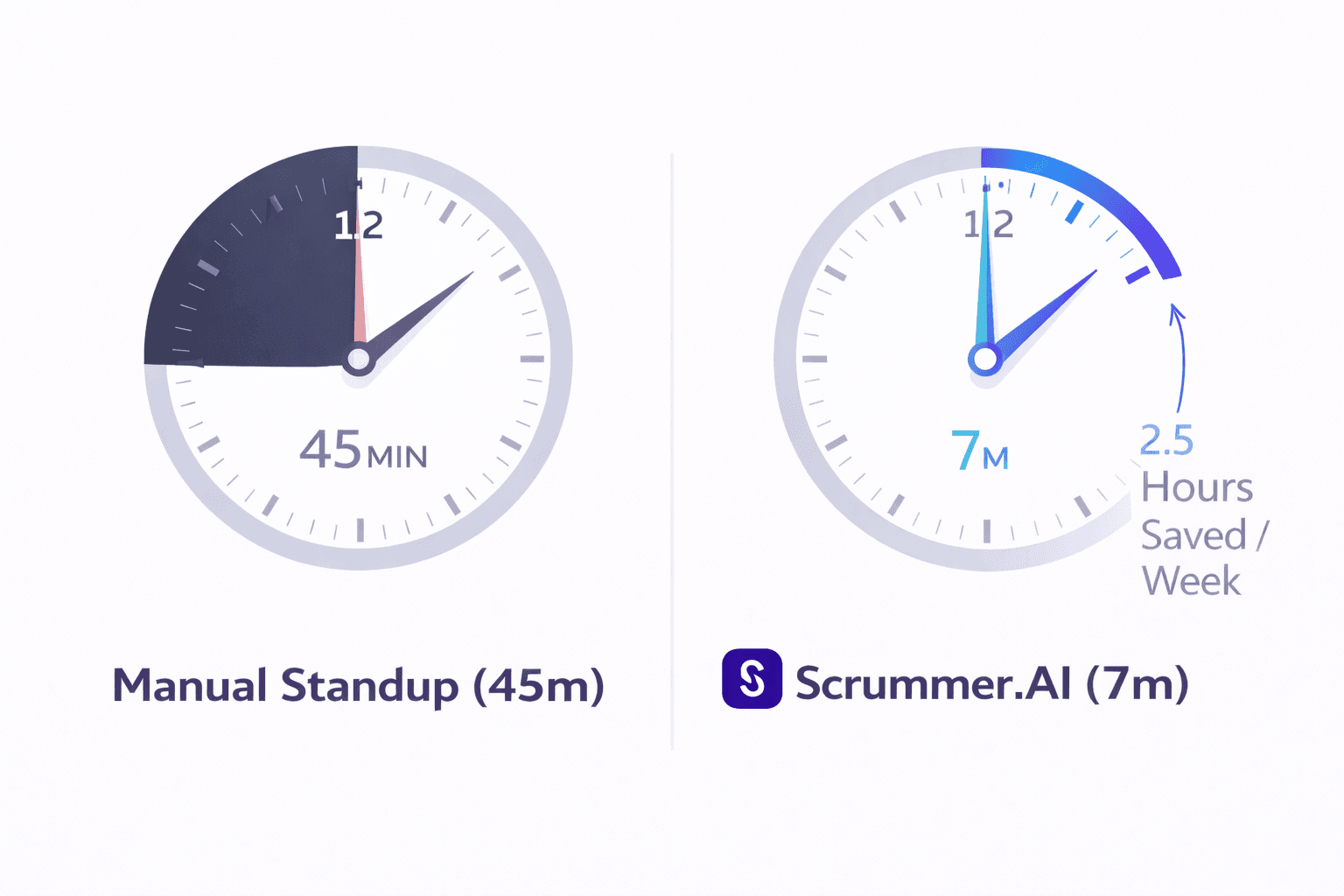
The Problem: Daily standups have morphed into 45-minute status reporting sessions that kill developer flow and fail to unblock anyone.
The Solution: Let AI capture updates from where your team already works (Slack, Teams, Meet) and turn conversations into action—no extra tools to check.
The Outcome: A 7-minute high-energy sync focused only on blockers, with 2.5 hours of focus time returned to every dev, every week.
Who This Is For: Engineering Managers, Tech Leads, and Product Managers watching their team zone out on Zoom every morning.
When to Use It: If your "15-minute" standup routinely hits 30+ minutes, updates get lost in chat threads, and blockers linger for days.
The Zombie Standup
It's 9:03 AM. You're on Zoom. There are 12 people on the call. One developer is talking about a specific API payload issue. One person is listening. The other 10 people are checking their email.
We've all been there. The "15-minute daily scrum" was designed to be a high-energy sync to align the team. But in reality, it has mutated into a low-value status report where highly paid engineers recite what they did yesterday just to prove they were working.
If your standup routinely hits the 30-minute mark, it's not a standup anymore. It's a "comfort meeting" for management. And it is costing you expensive flow state every single morning.
The purpose of a standup is to unblock the sprint, not to recap the timesheet.
The fix isn't to cancel the meeting (teams need connection). The fix is to let AI handle the "Update" so humans can handle the "Blocker."
Why We Failed at "Async"
A few years ago, many teams tried to fix this with "Async Standups" using Slack bots to ask What did you do yesterday?
It mostly failed. Why? Because it turned into a text-based status report that everyone ignored. Updates stayed in Slack. Nothing synced anywhere. Blockers went nowhere.
The missing link was action. To actually fix the standup, you need an AI agent that lives in your daily workflow—Slack, Teams, and Meet—and coordinates the entire standup lifecycle from one place.
The New Framework: The AI-Facilitated Standup
Here is what the modern, efficient engineering morning looks like when you introduce a tool like Scrummer.ai.
Scrummer captures unstructured updates from Slack, Teams, and Meet and organizes them directly into Jira, removing the need for manual status reporting.
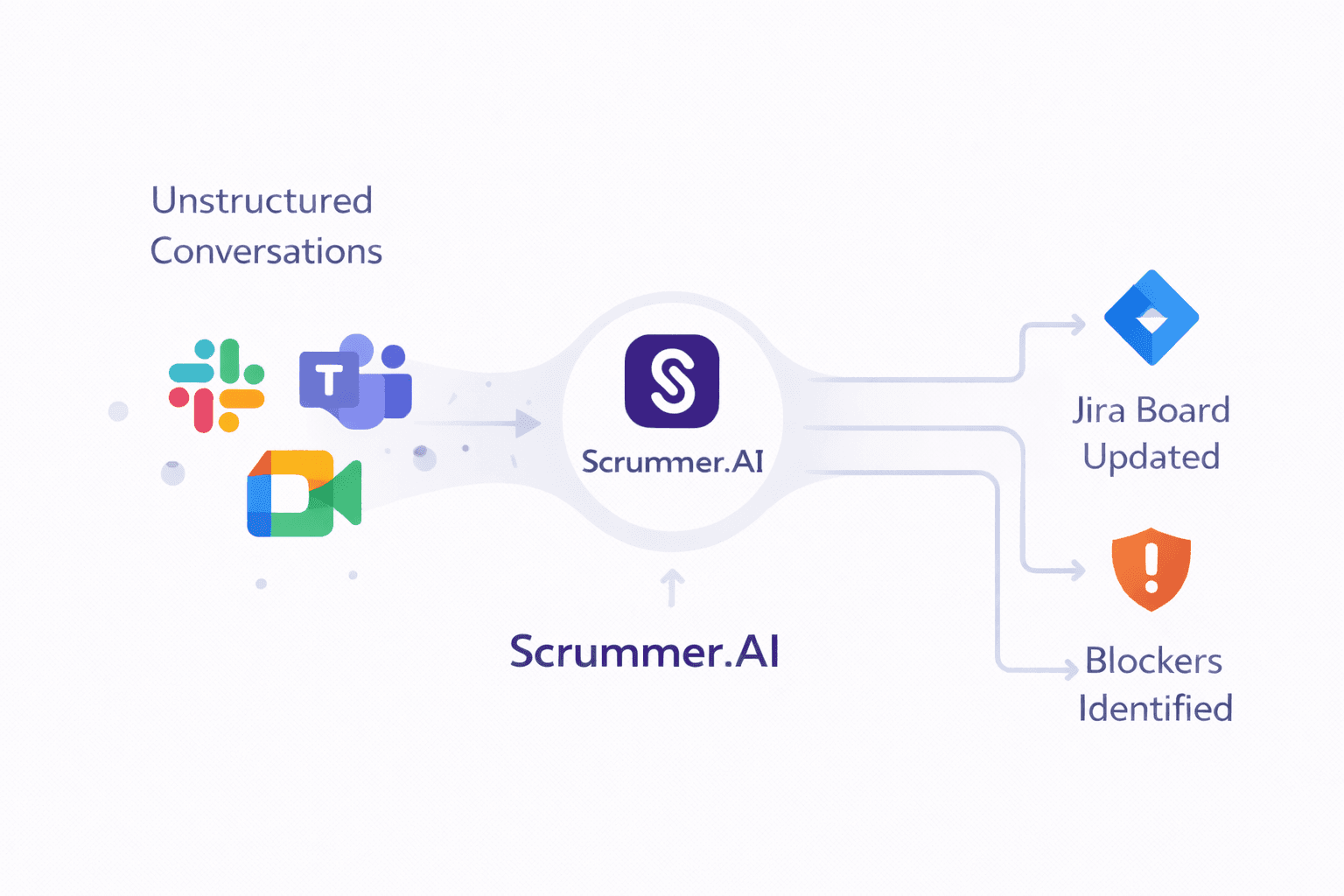
Scrummer lives inside Slack, Microsoft Teams, and Google Meet—the tools your team already uses every day. It captures updates from conversations, meeting transcripts, and daily check-ins, then organizes everything into one coherent standup digest.
1. The Pre-Meeting "Grooming" (Async in Slack/Teams)
At 8:30 AM (or whenever the dev logs in), Sasha (the Scrummer Agent) pings them in their Slack or Teams DM: "Hey, what's the plan for today?"
The dev replies right in Slack: "I fixed the login bug yesterday. Today I'm starting the Payment Gateway."
Here's where the AI is different. Sasha understands intent from natural conversation:
Agent Action: Logs "Login Bug" as completed.
Agent Action: Flags "Payment Gateway" as started.
Agent Action (optional): If you've connected a project tool like Jira, Sasha updates the ticket status automatically—so the dev never has to leave Slack.
Value for the Dev: No context switching. No remembering to update a board. Just chat where they already work.
2. The "Risk Report" (The Filter)
By 9:45 AM, Sasha has collected updates from everyone via Slack DMs, Teams channels, and any recent meeting transcripts.
It generates a Standup Digest and posts it in your team's Slack channel (or Teams channel):
✅ 6 Devs are on track.
⚠️ Risk: Sarah and Mike both mentioned working on the "Search" module in separate threads but haven't spoken. Dependency risk.
🛑 Blocker: Dave said in yesterday's Meet call he's waiting on API keys from DevOps (2 days stalled).
If you're using sprint tracking (Jira), Sasha also flags velocity trends: "Team closed 18 tickets last sprint but only 9 so far this sprint with 3 days left - sprint goal at risk."
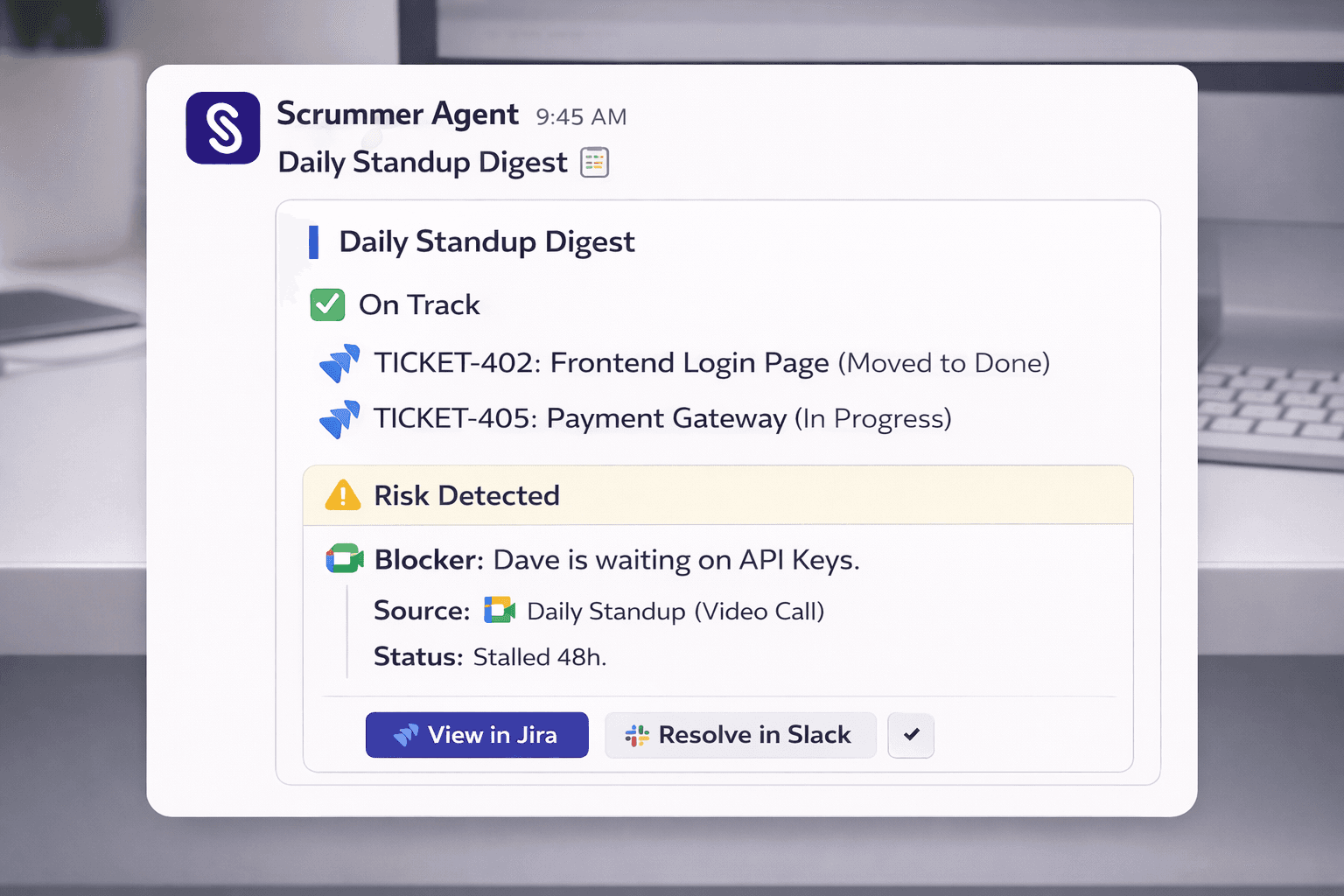
The standup summary lives in the tool your team checks 100 times a day—Slack or Teams—not buried in email or a dashboard no one visits.
3. The 7-Minute Sync (Human, on Meet/Zoom)
At 10:00 AM, the team hops on Google Meet (or Teams video). You skip the round-robin updates. Everyone already saw the standup digest in Slack.
You focus ONLY on the red flags:
"Dave, let's swarm on those API keys after this call."
"Sarah, Mike—are you stepping on each other's toes with the Search module?"
Sasha joins the meeting (if you've enabled it), listens to the conversation, and captures any decisions or new action items.
When you remove the status updates, the standup becomes a tactical planning session.
4. The "Swarm" (Post-Meeting in Slack/Teams)
In a traditional standup, if Dave says "I'm blocked," the Manager writes a note to email DevOps later.
With Sasha, the resolution is instant—right in Slack or Teams:
Agent Action: Sasha creates a dedicated DM thread in Slack with Dave and the DevOps Lead immediately.
Agent Action: Monitors the thread. If no reply in 4 hours, pings Dave: "Still stuck? Need escalation?"
Agent Action: Once resolved, logs the outcome. If you use Jira, it adds a comment to the ticket with resolution time for retrospective tracking.
During the Meet call, if someone says "We need a ticket for that login timeout," Sasha hears it in the meeting transcript and creates a task—either in Slack (as a thread to follow up on) or directly in your connected project tool (Jira).
The key: All of this happens in Slack, Teams, and Meet. Your team never has to leave their daily tools to "update the system."
Role-Based Value: What's In It For You?
For the CTO: You get real-time visibility into team health without asking for status updates. Sasha surfaces sprint risk, velocity trends, and blockers directly from where work happens—Slack conversations and meeting transcripts—not from manually updated dashboards.
For the Engineering Manager: You stop being a "Meeting Janitor." You don't chase people for updates or manually sync Slack threads to project boards. Sasha does it. You spend your time unblocking, not nagging.
For the Product Manager / Product Owner: You finally see what's actually in flight without pulling the EM into another sync. Check the standup digest in Slack every morning. When priorities shift, you know exactly what's blocked and what can absorb new work.
For the Senior Dev: You get your morning back. No more listening to the frontend team discuss CSS padding while you wait to give your backend update. And you never have to open Jira again—just reply to Sasha in Slack and your work is tracked.
EMs should never be "meeting janitors." Your tools should meet your team where they work—not force them into another system.
Common Objections
"We lose the team bonding if we don't talk every day."
Real bonding happens when you solve a hard problem together, not when you listen to someone recite ticket numbers. By saving 20 minutes of boredom, you create space for actual pair programming or coffee chats.
"My team won't reply to a bot."
Teams hate replying to dumb bots. They love tools that save them work. If the bot says, "Tell me what you did in Slack, and I'll handle all the admin," adoption is rarely an issue.
"Is this just for remote teams?"
No. Even co-located teams live in Slack/Teams and do video standups. The goal is to respect everyone's time and eliminate busywork, regardless of where they sit.
"We don't use Jira. Does this still work?"
Yes. Scrummer's core value is coordinating your team in Slack, Teams, and Meet. Project management integrations (Jira) are optional add-ons. Even without them, you get standup summaries, blocker coordination, and meeting intelligence—all in the tools you already use.
"Is our data safe? What about sensitive production conversations?"
Enterprise-grade AI agents operate with SOC 2 compliance, role-based permissions, and encrypted storage. You control what the agent can access—it only sees the Slack channels, Teams channels, and meetings you authorize. Learn more about secure integrations
Actionable: How to Kill the 30-Minute Meeting
You can transition to this model next sprint.
The "No-Status" Rule: Announce that next week, the synchronous call is for Blockers Only.
Deploy the Agent: Install Scrummer into your Slack workspace or Teams. Configure Sasha to ask for daily updates 1 hour before your standup time.
Review the Digest: Before the call, check the standup summary Sasha posts in your team channel.
Timebox the Call: Set a hard stop at 10 minutes. If no one has blockers, end the call in 2 minutes.
(Optional) Connect Your Project Tool: If you use Jira, connect it so updates from Slack automatically sync to tickets. If not, skip it—Sasha still coordinates everything in Slack/Teams.
If the meeting ends early, give the time back. Do not fill the void with filler talk.
FAQ
Q: Does this replace my Scrum Master?
No. A good Scrum Master coaches the team, removes organizational blockers, and improves process. Sasha handles the repetitive admin work—collecting status in Slack/Teams, posting digests, flagging risks, coordinating blockers. Think of it as a force multiplier, not a replacement.
Q: What if someone forgets to update the bot?
Sasha sends gentle reminders in Slack/Teams and can infer status from meeting transcripts or activity. If someone is consistently silent, the EM gets a flag—but it's no different than someone ghosting the live standup.
Q: Can this work without Jira or Linear?
Yes. Scrummer's core functionality lives entirely in Slack, Teams, and Meet. You get standup digests, blocker threads, meeting summaries, and follow-up coordination without connecting any project management tool. Integrations are optional for teams that want automatic ticket syncing.
Q: What meeting platforms does this support?
Google Meet and Microsoft Teams (video calls). Sasha joins the meeting (when enabled), listens to the conversation, and captures action items and decisions.
Q: How long does it take to set up?
Typically 10–15 minutes: install the Slack or Teams app, connect your Google or Microsoft calendar, configure your standup check-in time, and you're live. Project tool integrations (Jira) are optional and take another 5 minutes if you want them.
Conclusion
The 30-minute standup is a relic of a time when we didn't have intelligent tools to track work. It survives on inertia, not value.
By letting Scrummer.AI coordinate status updates in Slack, Teams, and Meet - the tools your team already uses - you aren't just saving time. You're signaling that you respect their focus and trust them to work where they're most productive.
Stop meeting to talk about work. Meet to move work forward.